国际化教程
目录
👉苹果加速器【一键连接版】下载使用教程
👉安卓加速器【一键连接版】下载使用教程
👉win电脑加速器【一键连接版】下载使用教程
👉Mac电脑加速器【一键连接版】下载使用教程
【苹果系统】小火箭
本文档使用 MrDoc 发布
-
+
首页
【苹果系统】小火箭
<div style="background: #fff2f2; border: 1px solid #f5c6c6; border-radius: 8px; padding: 16px; box-sizing: border-box;"> <div style="font-size: 18px; font-weight: bold; color: #dc3545; margin-bottom: 10px;">⚠️ 阅前须知</div> <div style="font-size: 15px; color: #333; line-height: 1.8;"> <div>⚠️ 没有小火箭的需要先下载小火箭!</div> <div>⚠️ 下载小火箭需要登录美区ID!</div> <div>⚠️ 有小火箭的直接看教程导入即可!</div> </div> </div> <div style="display: grid; grid-template-columns: 1fr; gap: 20px; max-width: 100%; margin: 20px 0; font-family: system-ui, sans-serif;"> <!-- 第一步 4个蓝色下载按钮 + 手动粘贴图片位置 --> <div style="border: 1px solid #e4e7ed; border-radius: 12px; padding: 20px; background: #fff; box-shadow: 0 2px 8px rgba(0,0,0,0.06);"> <h3 style="margin: 0 0 12px; font-size: 16px; color: #2c3e50;">第一步:获取美区ID下载Shadowrocket/小火箭</h3> <p style="margin: 0 0 15px; font-size: 14px; color: #555;">下载小火箭需要登录美区ID,没有美区ID请点击下方按钮获取免费ID下载</p> <p style="margin: 0 0 15px; font-size: 14px; color: #555;">登录美区ID后搜索下载(注意别下载错了,小火箭是英文的):Shadowrocket</p> <!-- 👇在这里直接粘贴图片(APP缩略图大小) -->  <div style="margin: 10px 0; text-align: center;"></div> <div style="display: flex; flex-wrap: wrap; gap: 10px; margin-top: 10px;"> <a href="https://aunlock.laomaos.com/share/REpVrvluCJ" style="display: inline-block; padding: 8px 14px; background: #1677ff; color: #fff; text-decoration: none; border-radius: 6px; font-size: 13px; font-weight: 500; text-align: center;">👉点击获取美区ID+下载小火箭</a> </div> </div> >第二步:注册抖音加速器账号 > > [👉点击注册抖音加速账号](http://47.93.7.109:10086/#/register?code=LB3DrdyJ) > > [👉点击注册抖音加速账号](http://218.244.142.188:20011/#/register?code=LB3DrdyJ) > > 注册必须填写邀请码,邀请码是:LB3DrdyJ > > > 输入您的兑换码即可兑换该套餐 > > > 兑换码是:632546 > >s 兑换步骤:输入兑换码——点击验证——点击下单 >d **注:该兑换码采用22.8元优惠卷形式,也可以用来购买其他套餐进行抵扣22.8元,所有套餐通用,仅限使用一次** > > 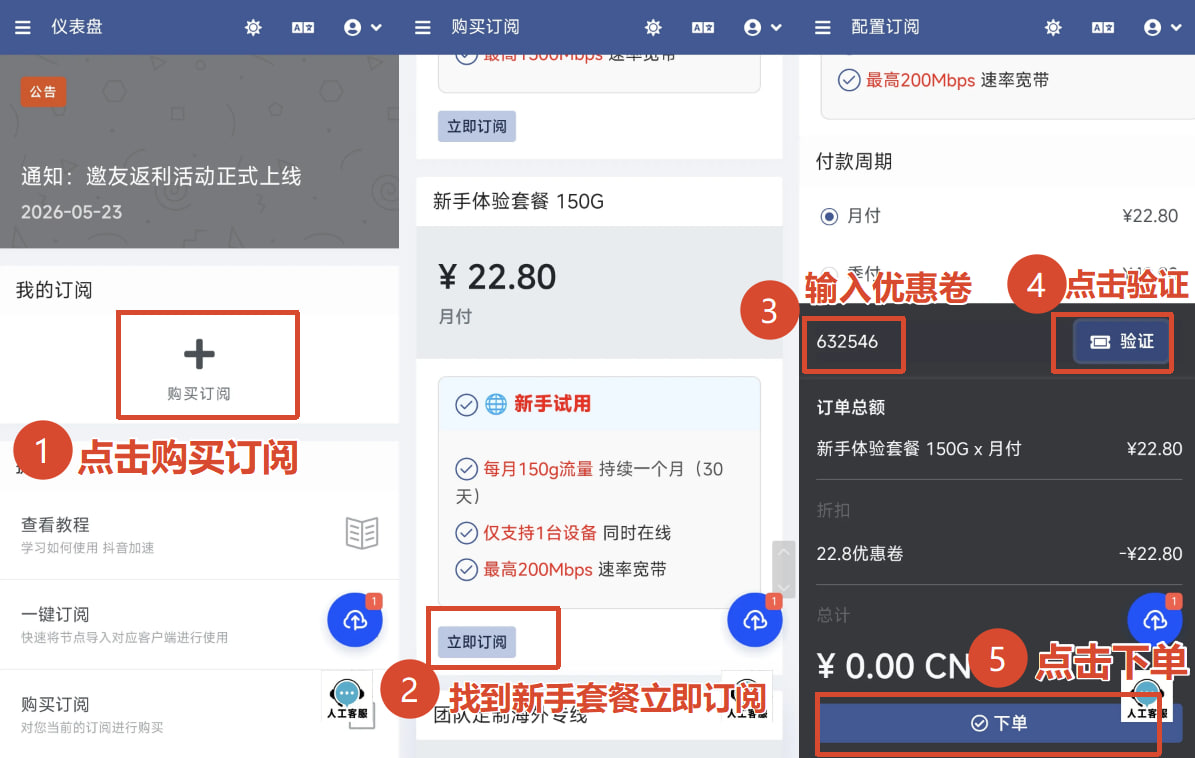 </div> <!-- 第三步 手动粘贴图片位置 --> <div style="border: 1px solid #e4e7ed; border-radius: 12px; padding: 20px; background: #fff; box-shadow: 0 2px 8px rgba(0,0,0,0.06);"> <h3 style="margin: 0 0 12px; font-size: 16px; color: #2c3e50;">第三步:购买完成后点击导入节点导入订阅节点</h3> <p style="margin: 0 0 15px; font-size: 14px; color: #555;"></p> <!-- 👇在这里直接粘贴图片 --> 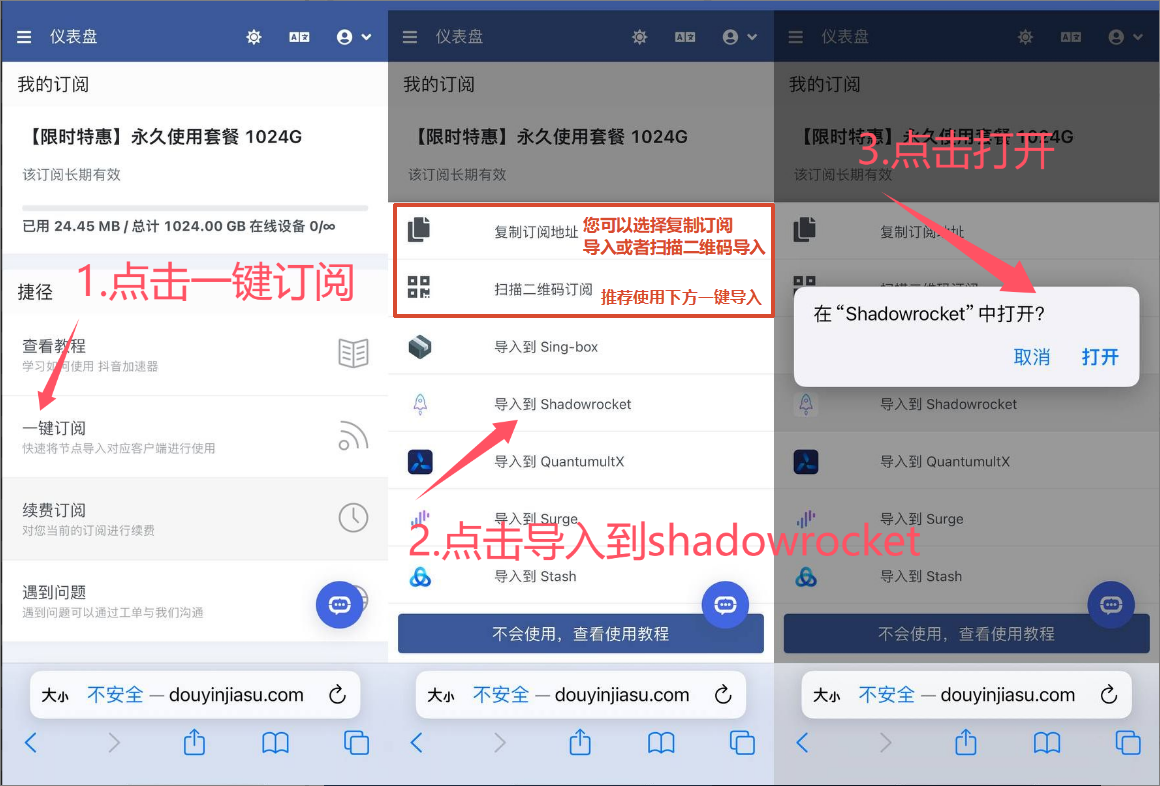 <div style="margin: 10px 0;"></div> </div> <!-- 第四步 手动粘贴图片位置 --> <div style="border: 1px solid #e4e7ed; border-radius: 12px; padding: 20px; background: #fff; box-shadow: 0 2px 8px rgba(0,0,0,0.06);"> <h3 style="margin: 0 0 12px; font-size: 16px; color: #2c3e50;">第四步:小火箭【Shadowrocket】使用【更新订阅】</h3> <p style="margin: 0 0 15px; font-size: 14px; color: #555;">每次使用一点要更新订阅,确保能使用到最新路线</p> <!-- 👇在这里直接粘贴图片 --> 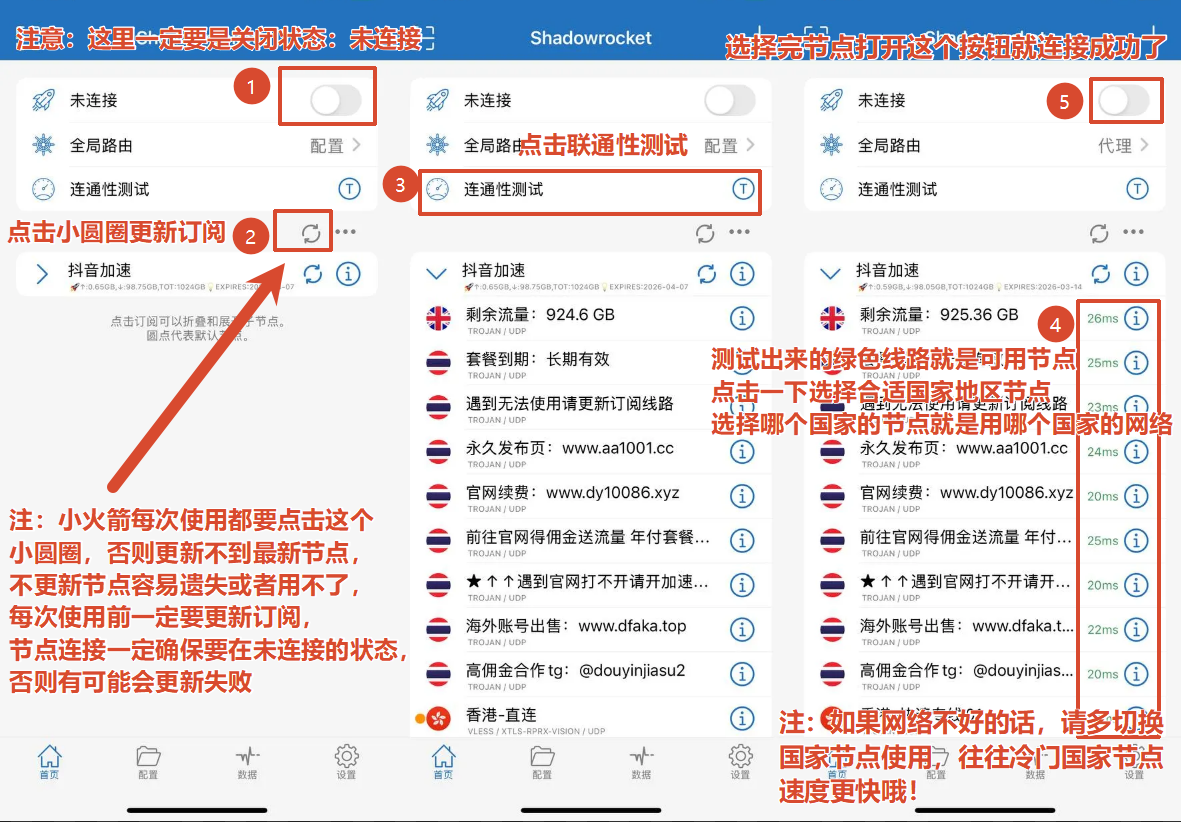 <div style="margin: 10px 0;"></div> </div> <!-- 第五步 手动粘贴图片位置 --> <div style="border: 1px solid #e4e7ed; border-radius: 12px; padding: 20px; background: #fff; box-shadow: 0 2px 8px rgba(0,0,0,0.06);"> <h3 style="margin: 0 0 12px; font-size: 16px; color: #2c3e50;">第五步:进阶玩法:全局模式</h3> <p style="margin: 0 0 15px; font-size: 14px; color: #555;"></p> <!-- 👇在这里直接粘贴图片 --> 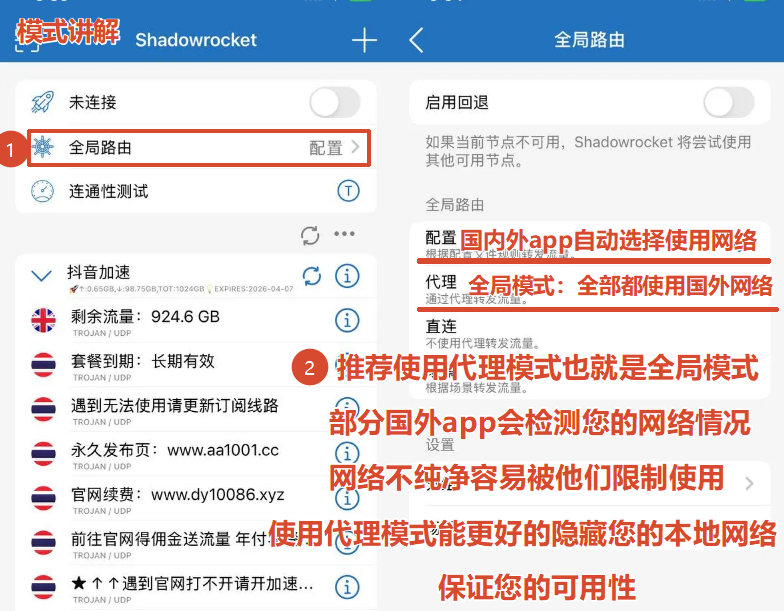 <div style="margin: 10px 0;"></div> </div> <!-- 第六步 4个蓝色下载按钮 + 手动粘贴图片位置 --> <div style="border: 1px solid #e4e7ed; border-radius: 12px; padding: 20px; background: #fff; box-shadow: 0 2px 8px rgba(0,0,0,0.06);"> <h3 style="margin: 0 0 12px; font-size: 16px; color: #2c3e50;">第六步:网络测速和IP查询</h3> <p style="margin: 0 0 15px; font-size: 14px; color: #555;">连接后点击下方按钮测速或者查询ip地址 </p> <p style="margin: 0 0 15px; font-size: 14px; color: #555;">测速详解:APP内测试延迟和真实网络速度无关联性,网络不好可以尝试切换本地网络,如联通换移动,移动换联通,各个运营商网络都不一致</p> <p style="margin: 0 0 15px; font-size: 14px; color: #555;">IP详解:IP和你连接的网络时使用智能模式或全局模式有很大的关联,全局模式能更好的伪装成国外IP,如需要完全伪装,请拔掉你的手机卡并且关闭蓝牙,手机设置里面时间日期地区全部改成需要伪装的地区即可完全伪装</p> <!-- 👇在这里直接粘贴图片(APP缩略图大小) -->  <div style="margin: 10px 0; text-align: center;"></div> <div style="display: flex; flex-wrap: wrap; gap: 10px; margin-top: 10px;"> <a href="https://www.youtube.com/" style="display: inline-block; padding: 8px 14px; background: #1677ff; color: #fff; text-decoration: none; border-radius: 6px; font-size: 13px; font-weight: 500; text-align: center;">👉点击油管观看视频测速 </a> <a href="https://fast.com/zh/cn/" style="display: inline-block; padding: 8px 14px; background: #1677ff; color: #fff; text-decoration: none; border-radius: 6px; font-size: 13px; font-weight: 500; text-align: center;">👉点击查询真实节点网速显示 </a> <a href="https://www.ip111.cn/" style="display: inline-block; padding: 8px 14px; background: #1677ff; color: #fff; text-decoration: none; border-radius: 6px; font-size: 13px; font-weight: 500; text-align: center;">👉点击查询连接后的IP地址 </a> </div> </div>
uu123
2026年6月17日 20:30
转发文档
收藏文档
上一篇
下一篇
手机扫码
复制链接
手机扫一扫转发分享
复制链接
Markdown文件
PDF文档(打印)
分享
链接
类型
密码
更新密码